For landscape, lawn, tree and snow businesses
You grow the landscapes. Prune runs the rest.
Quotes, crew schedules, time on site, invoices and payments in one place.
No setup fees. Import your customers from Excel or CSV.
Every morning, one list.
What needs you today, each item linked to where you fix it.

The crew sees the day. Not the books.
Today's stops, the scope and the notes on any phone. Invoices and payments stay with the office.
- Clock in on site. GPS checks they are at the property.
- Photos and checklists attach to the right job.
- Hours flow into job costing against the budget.

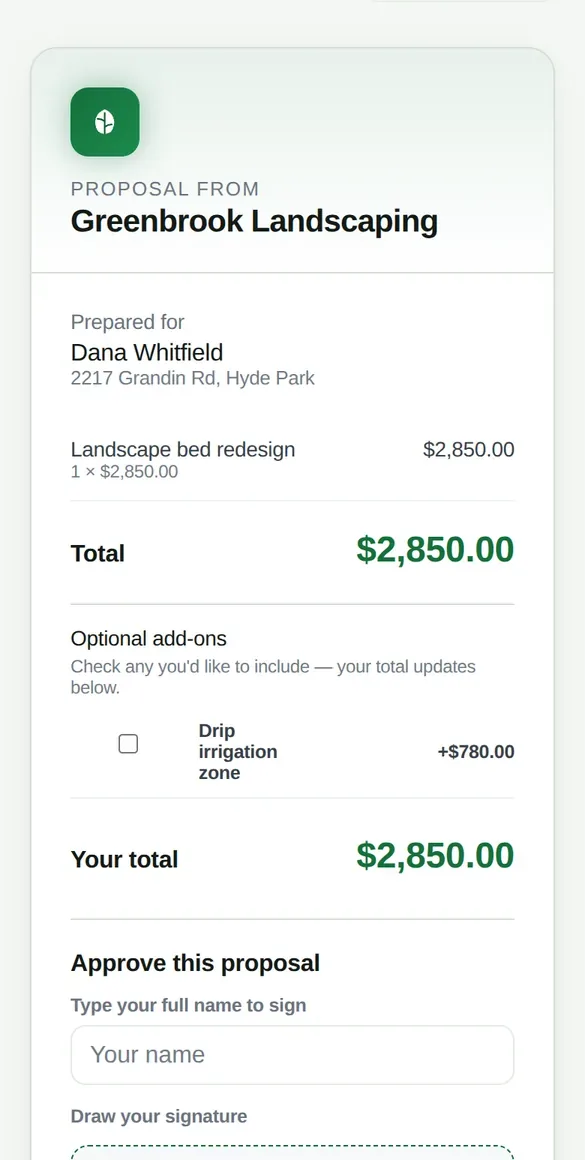

Customers approve and pay from their phone.
They pick options, sign, and pay by card once you connect Stripe. Checks and cash are marked paid by your office, never by the customer.
From first call to paid.
- LeadRequests from your booking page land in one inbox.
- QuoteGood, Better and Best options from your prices.
- ApprovalSigned online. The estimate becomes a job.
- DepositNever more than the job total.
- ScheduleDrag onto the crew calendar. Time off is checked.
- WorkClock in, photos, tasks and materials.
- InvoiceSent with a pay link.
- ReviewRequested when the invoice is paid.
Also in Prune.
- Recurring service
- Weekly and monthly contracts with their own crew. Days off are skipped.
- Reminders
- Visit, quote and overdue reminders by email and text, once a sender is connected.
- Routes
- The day's stops in a sensible order.
- Import
- Excel or CSV customer lists, columns matched for you.
- Reports and job costing
- Revenue, expenses and margin from your real records.
- Warranty, equipment and training
- Claims, maintenance records and crew certifications.
- Live crew map
- Location is shared only while a crew member is clocked in.
- QuickBooks export
- A QuickBooks-ready CSV. Live two-way sync is not built yet.
A few straight answers.
Do my crews need to download an app?
No. Prune runs in the browser on any phone and can be added to the home screen.
How do customers pay?
By card from the invoice link, into your own Stripe account. Checks and cash are recorded by your office.
Can I bring my customers over?
Yes. Upload an Excel or CSV file and Prune matches the columns.
Does it work with QuickBooks?
You can export invoices and payments as a CSV that QuickBooks imports. A live connection is not built yet.
Will it text and email my customers?
Once you connect an email sender and a texting number. Customers who reply STOP are never texted again.
What can my crew see?
Their schedule, job scope, notes and tasks. Invoices, payments and reports are office-only.
Send your first quote today.
Set up your company and import your customers in a few minutes.